Guide
Recording test scores
Record → Test Scores — enter tests, compute a unit average, then lock for report cards.
On this page
Who appears
Students year-enrolled and course-enrolled for the selected year. Homeroom sees courses at their grade levels (or every course their students take, if that option is on). Teacher sees only assigned courses, including every student in them. Homeroom + Teacher uses the assigned courses for this page. Admins who also teach can set that on themselves under Settings → Users → Manage (role stays admin).
Enter scores
- Pick year and course; open a unit.
- Add tests from the unit’s pattern (+ or Ctrl/Cmd+Shift+1…9). One group → + adds that group immediately.
- Type scores in the grid; Ctrl/Cmd-Enter saves dirty cells.
- Click a test title for detail (date, notes, skip that test).
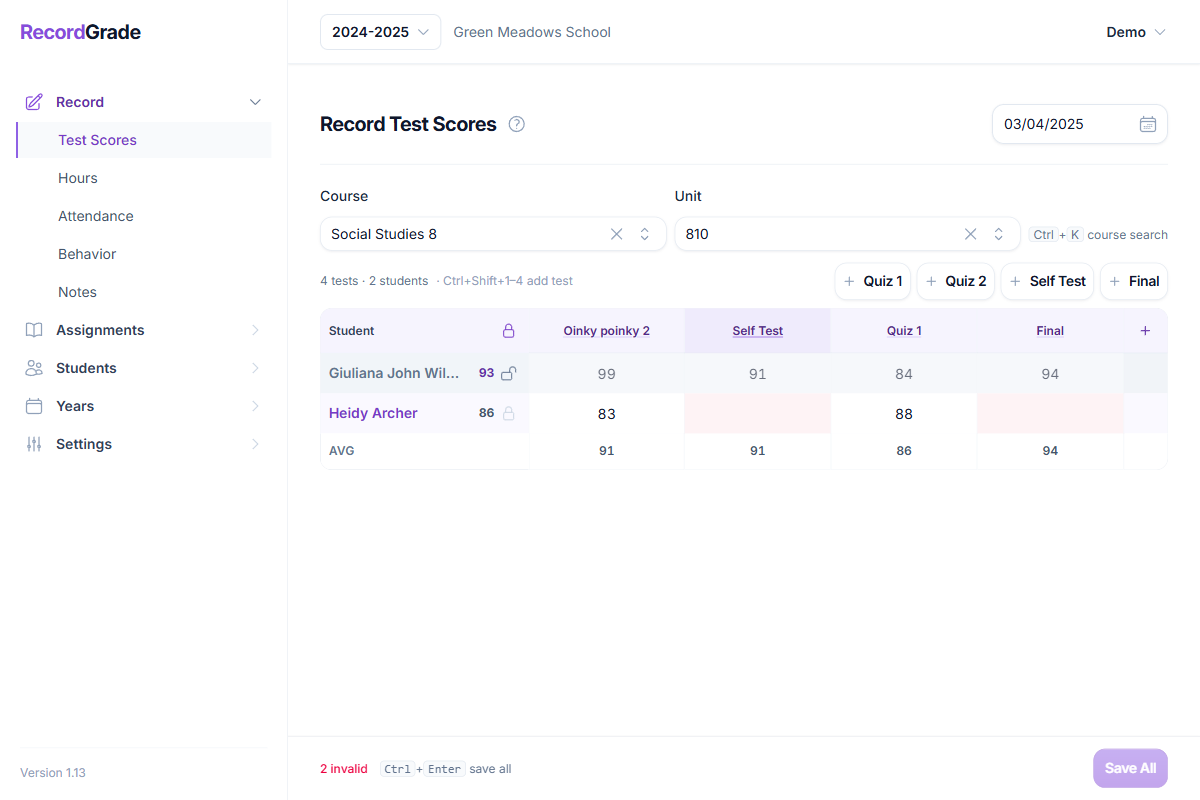
The live unit average uses the unit’s test pattern (weighted groups). Empty groups are ignored. Full shortcut list: Keyboard shortcuts.
Lock unit
Publishes a unit grade (percent average, rounded) plus credit for that unit, and freezes the unit for that student. That locked value is what report cards and transcripts use—not the individual tests. The lock also stores the school-year term and week from the completion date—report cards only show term columns for terms that have at least one locked unit grade for that student.
Missing on a report card? Confirm the unit is locked, the student is enrolled, and report settings show grades as expected. Missing a whole term column usually means no locked units in that term yet.
Skip unit
If the student has no numeric scores (or every test is skipped), use Skip. The unit still counts for progress; reports show SKIP; averages ignore it; credit can still be awarded. Unlock the same way as a graded unit if you need scores later.
Common questions
What exactly is the “report grade” for a unit?
It is the locked unit average: group averages weighted by the pattern’s weights, renormalized over groups that have scores, then stored as a whole-number percent when you lock. Changing pattern weights later does not rewrite already locked grades.
How are course and term averages built?
From locked unit grades only. Skipped (null) units are left out of averages. School setting Term Average Calculation Method chooses course average, weighted-by-completion, or flat unit average. Decimals and letter grades follow report settings.
Can I unlock after locking?
Yes—delete/unlock the unit grade for that student. Test scores may still be on the unit so you can re-lock. Use carefully after report cards have been issued.
Student already locked this unit last year—why can’t I lock again?
Units are shared across years. A prior lock for that student+unit still blocks a new lock until that unit grade is removed. See retakes under Courses & gradebook.
What if I delete a test that already has scores?
Deletion is blocked while student scores exist on that test. Clear or reassign scores first, or leave the test in place.
Import instead of the grid?
Students → Grades → Import can write locked unit grades (including SKIP). See Import unit grades.
Wrong term or week on the report card after terms changed
Term and week are set from the unit’s completion date when you lock or save the grade. They are not updated if you change school-year term dates later. Open each affected grade, Edit, and save again to reassign term and week. Mid-year term changes are strongly discouraged—see Years & enrollments.