Guide
Courses & gradebook
Structure graded work: course → unit → tests. Locked unit grades become report card and transcript history.
On this page
Model
- Course — subject (title, category, credits, grade level, unit count).
- Unit — chunk of the course with a test pattern; the locked unit average is what report cards use.
- Tests — individual scores under pattern groups; used only to compute the unit average until the unit is locked.
Courses
Assignments → Manage Courses
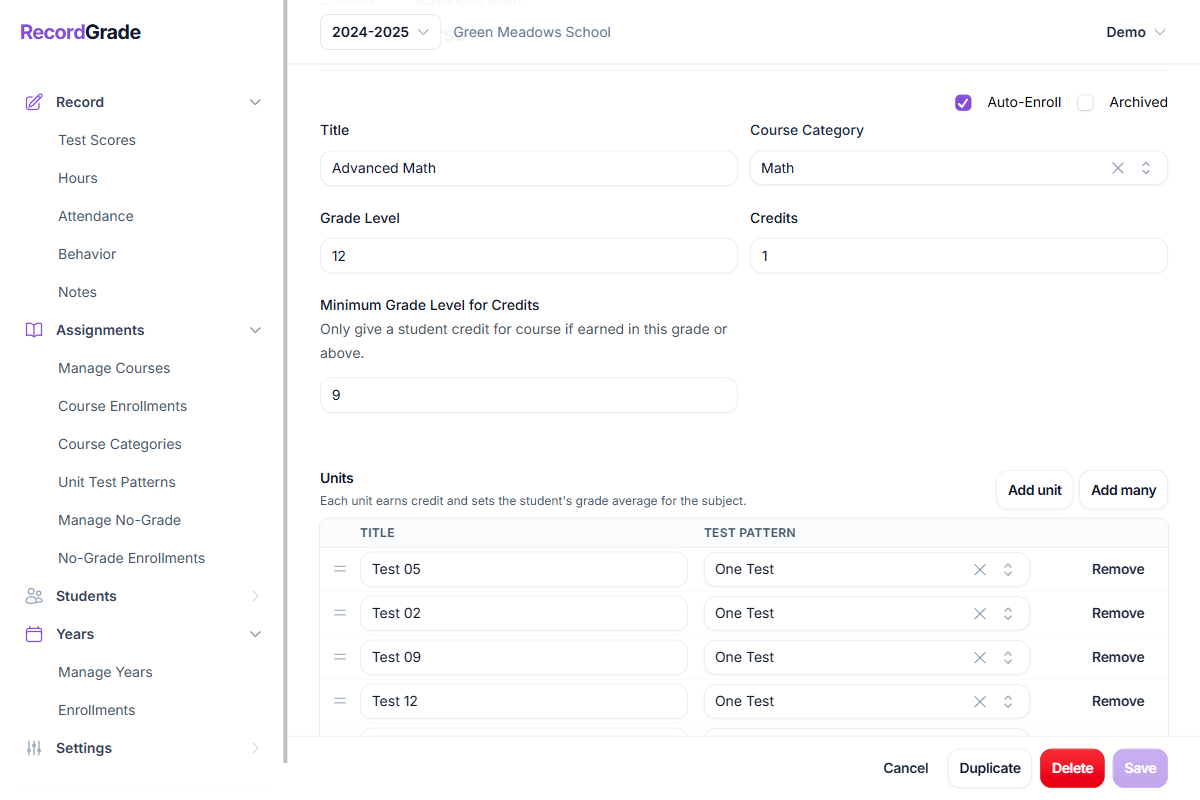
Set title, category, grade level, total credits, minimum grade level for credit, auto-enroll, archive. Archive hides a course from everyday lists without deleting history. Students can enroll in courses outside their grade level when your program allows it.
Units
Each unit has a title, order, and a test pattern. Add units one at a time or in bulk. Only locked unit grades print as final grades on report cards. Credit per locked unit is typically:
Course total credits ÷ number of units on the course (zero if the student’s grade is below the course’s minimum grade level for credit).
Test patterns (Unit Test Patterns)
Assignments → Unit Test Patterns
A pattern is a named set of groups (e.g. Quiz, Final), each with a weight. On the grade grid you add tests under those groups. When the unit average is calculated:
- Each group’s score is the average of its tests that have numeric grades.
- Empty groups (no scored tests) are ignored; weights are renormalized over groups that have scores.
- Skipped tests do not contribute scores.
Quiz (weight 60), Final (weight 40)

Quiz tests 80 and 90 → group avg 85
Final 75
Unit = 85×(60/100) + 75×(40/100) = 81%
On the grade grid, Ctrl/Cmd+Shift+1…9 adds a test for the Nth group. Patterns are school-wide; any unit can use any pattern.
Enrollments
Assignments → Course Enrollments
Student must be year-enrolled first. Auto-enroll on a course helps when most of a grade takes the same class. You cannot unenroll a student who already has test scores or unit grades in that course. Entering scores: Recording test scores.
Common questions
What if I change units while students are taking the course?
Add units — they appear for everyone enrolled; new empty work to score and lock.
Rename / reorder / change a unit’s pattern — allowed. Open work uses the new structure. Already locked unit grades are not recalculated—they stay as stored snapshots.
Delete a unit — fails if any student has grades or test scores on that unit. Tests with no scores are deleted with the unit. Unlock/remove grades first if you are correcting setup before history matters.
Changing total course credits or unit count affects future locks (credit per unit = credits ÷ unit count at lock time). Prefer a new course rather than rewriting a course students have already finished.
What if I edit a unit test pattern after scores exist?
You can change group titles, weights, and add groups. You cannot delete a group that still has student test scores. Locked unit averages are not rewritten when weights change—only open (unlocked) calculation uses the new weights. Changing which pattern a unit points at does not wipe locked report-card grades.
What is the grade on the report card?
Report cards show locked unit grades (or SKIP). Course and term averages are built from those locked values using your report-card average method and decimal/letter settings—not from raw test scores. Unlock a unit only if you need to change that snapshot.
Can a student retake a course?
You can enroll the same student in the same course in a later school year. Units are shared across years: if a unit was already locked for that student, it still appears completed and cannot be locked again until that unit grade is deleted (unlocked). For a true retake with new unit grades, use a separate course (e.g. “Algebra I Retake”) or unlock prior unit grades deliberately. Contact customer support for details on complex retake policies.
What happens if I delete a course, enrollment, or locked grade?
- Course — fails if students are enrolled, or if any unit has student grades or test scores. Tests with no scores are deleted with the course. The error names the specific blocker.
- Course enrollment — fails if the student has test scores or unit grades in that course for the year. Unlock or delete those records first so the grades stay findable.
- Locked unit grade — delete/unlock removes that unit’s report-card snapshot so you can re-score.
Skip unit vs low grade
Skip locks the unit with no numeric grade (SKIP on reports). Credit can still be awarded the same way as a graded lock. Skipped units are left out of averages but still count toward progress (units completed / total). Prefer skip for “not taken / not graded,” not as a substitute for 0%.