Guide
Reports & transcripts
What prints, what is included, and how settings change the numbers.
Report cards
Print from Students → Grades (Report cards). Styles:
- Week — by term with week columns of unit/test detail, plus averages
- Total — courses × terms + year column, progress/credits if enabled
- Foldable — landscape layout for printed handouts
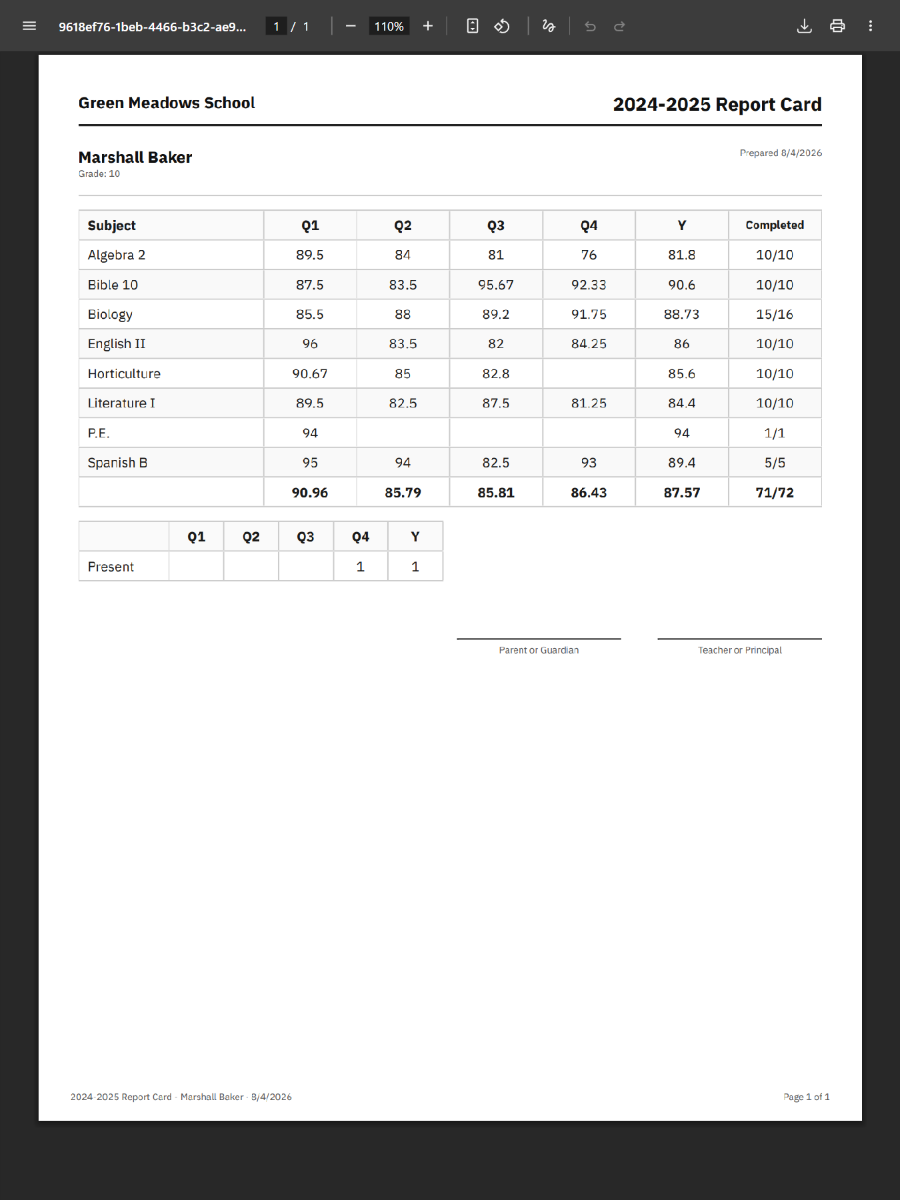
Only locked unit grades are final on the card. Unlocked work does not appear as a unit grade. Course cells are averages of graded (non-SKIP) locked units in that term or year, using your average method.
Term columns
Report cards only include terms that have at least one locked unit grade for that student. Empty terms (no locked units yet) do not get a column—even if the school year defines four quarters. Term columns are built from the terms on those locked grades, not from the full year calendar alone.
Report settings
Settings → Reports
- Report card — term average method, decimal places, Use Letter Grades, show attendance / behavior / notes / progress / credit / labs / signatures, default style.
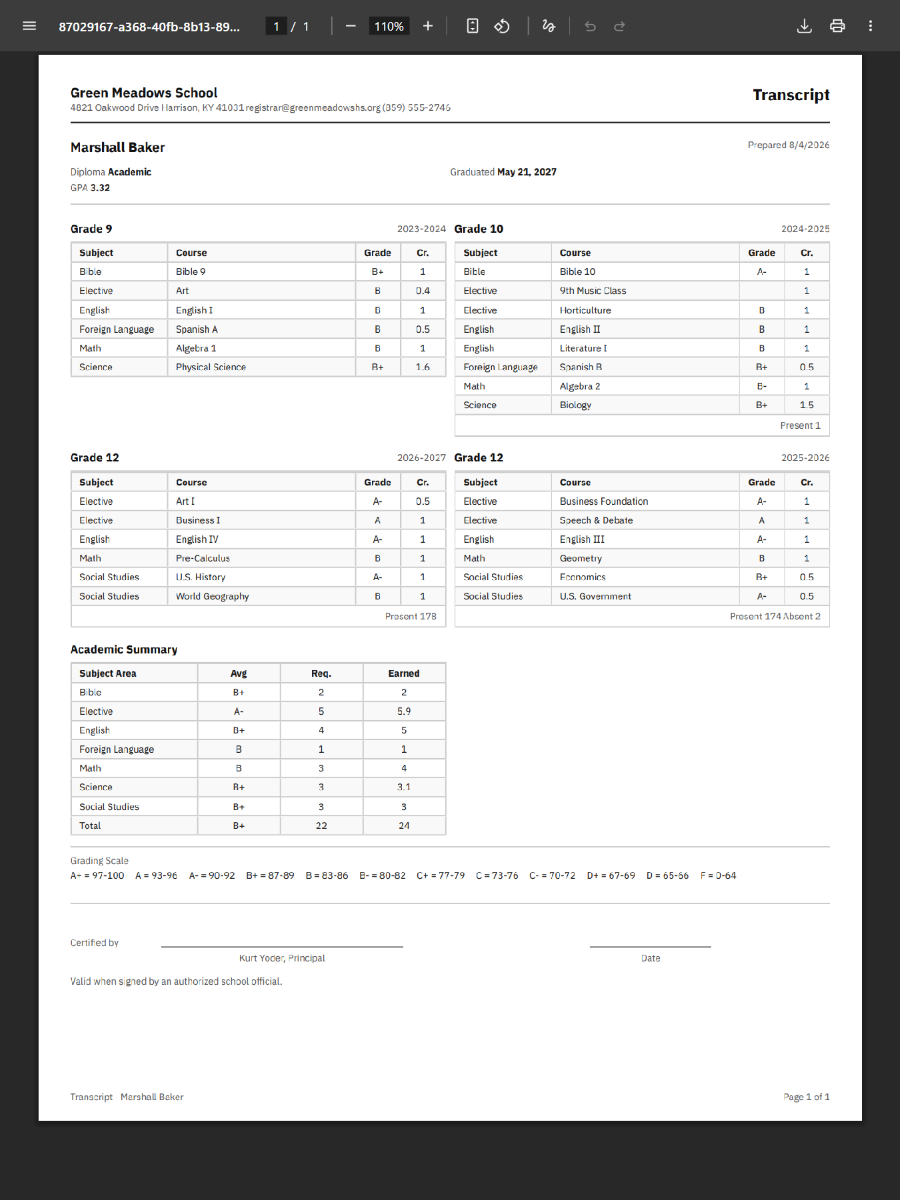
- Transcript — decimals, letter grades, GPA, summary, attendance, signature, and Show Pass/No Pass for no-grade courses (prints P on no-grade lines and includes 0-credit elementary no-grade courses; NP and W always print). Separate toggles from the report card.
- Attendance — hours per present day; one-time fill present / import year totals (see Attendance).
Letter grades use Settings → Grade Scale (highest matching minimum percent wins).
Transcript & permanent record
Students → Transcript — multi-year credit-bearing work (locked graded courses with credit, no-grade credit, manual entries), optional GPA and diploma line. No-grade No Pass/Withdraw lines appear with 0 credit (NP / W). With the Pass/No Pass setting on, Pass prints as P (including 0-credit no-grade courses). NP is not a letter-grade F.
Students → Permanent Record — multi-year office view of course history; averages use the transcript decimal setting. Pass / No Pass / Withdraw (P, NP, W) use the same transcript Pass/No Pass setting as the official transcript.
Both can show attendance (daily counts or imported year totals). Graduation level on the student profile can appear on the transcript when set.
Open the screen, pick students/style if offered, generate PDF in the browser (allow pop-ups). Ctrl/Cmd+P often triggers the same generate action when a print button is present.
Common questions
Why is a course blank or missing on the report card?
Common causes: no locked units yet; student not course-enrolled for the year; “only show grades” filter; or attendance/behavior sections hidden because there is no data and the toggle is off.
Why is a school term missing from the report card?
Term columns appear only when that student has at least one locked unit grade in that term. A quarter with no locked grades is omitted for that student. Lock units dated in the term (or edit/resave so the grade’s term is correct) to include the column. This is per student: another student with grades in that term will still see it on their card.
What is the term average / “Y” column?
Aggregates of locked unit grades for that term (or whole year for Y), using your school’s term average calculation method. Letter grades convert the resulting percent through the grade scale when enabled.
Report card vs transcript letter grades
They are separate settings. You can use letters on report cards without letters on transcripts (or the reverse). Both share the same grade scale definition.
Why does attendance show a single “Year” total?
Imported year attendance totals override daily marks and print as one year total instead of per-term counts. Clear the import under Settings → Reports → Attendance to return to daily term counts.
Why isn’t Present listed as 0 on the report card?
Attendance rows only appear for categories that have counts > 0. Untracked categories (including Present with no present days) are omitted, not printed as zero. See Attendance.
Permanent record decimals
Permanent record averages follow Transcript → Decimal Places in report settings (not the report-card decimal field).
I changed a locked unit’s tests—why didn’t the PDF change?
The report reads the locked unit snapshot. Unlock, fix scores, lock again to refresh that unit’s printed grade.
Grades are in the wrong quarter after I changed school terms
Term and week are stored on each unit grade when it is locked or saved. Changing term dates later does not move them. Edit and resave each affected student unit grade so term/week recalculate. Avoid mid-year term changes—see Years & enrollments.