Guide
Graduation & projections
Define credit requirements, issue a diploma (a snapshot on the student), and plan multi-year coursework against a target level.
On this page
Graduation levels
Settings → Graduation Levels
Each level has a title, overall minimum credits, description, and per–course-category requirements (min/max credits, optional minimum assignment grade level). Categories match Assignments → Course Categories.
Catalog vs diploma
The level in Settings is the live catalog. Issuing a diploma copies the title and credit requirements onto the student. You can keep editing the catalog for future classes; already-issued transcripts do not change. Delete is still blocked while a student record points at the level.
Issue a diploma
On the student edit screen, Graduation tab: pick a date and a level, then Issue diploma. That snapshot is what the transcript prints (diploma name, graduation date, required credits). The app does not block issuing if the student is short on credits—that check is a counseling responsibility. Projections are what validate a plan against the live level’s rules.
Replace diploma recopies from the selected level as it is defined now (explicit transcript change). Revoke diploma removes the diploma from the transcript; the catalog is unchanged.
Projections
Students → Projection — multi-year plan of courses/no-grade work and credits vs a graduation level. Not a substitute for year and course enrollments.
- Create a projection for the student.
- Add years and planned courses/no-grade work.
- Link a graduation level to see required vs projected credits and issues (under-projected categories, over-projected courses, grade-level rules).
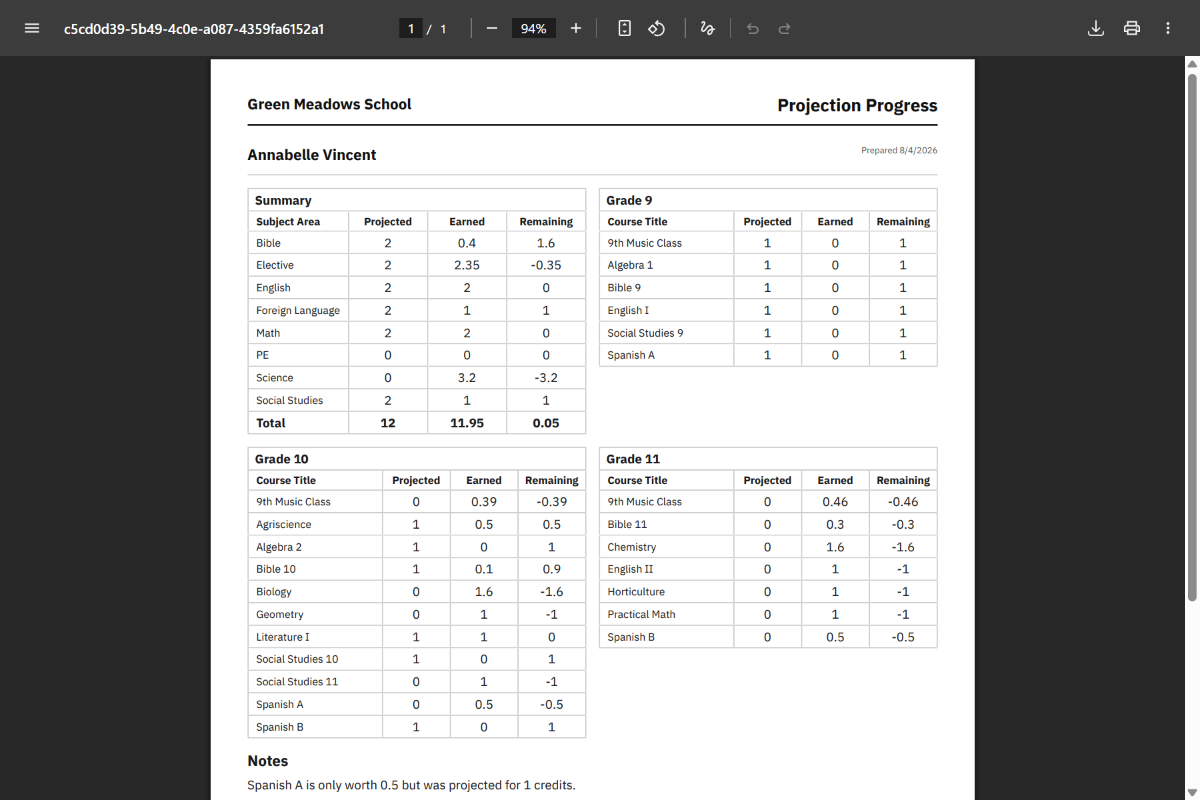
Print the plan PDF or the progress PDF (projected vs earned from the transcript). When a level is linked, both show the graduation target and required credits.
Common questions
Can I modify a graduation level after a student has been issued that diploma?
Yes for the catalog (title, credits, requirements). Issued diplomas keep their snapshot, so transcripts do not drift. Delete is still blocked while a student record points at the level. To put a new definition on a graduate, use Replace diploma on that student. Create a separate level when two classes must follow different live rules at the same time.
Does issuing a diploma prove the student met requirements?
No. Issuing is not credit-checked. Use projections (and your own transcript review) to verify. The snapshot is for diploma labeling and required-credit columns on the transcript; projections still validate against the live catalog.
Projection issues vs “looks good”
Issues include projecting more credit than a course is worth, missing min credits per category, exceeding max credits per category, or courses below the category’s minimum grade level. “Looks good” means those projection checks passed—not that the live transcript is complete.
Is a projection the same as enrollment?
No. Projections are planning only. Students still need year enrollment, course/no-grade enrollment, and locked work for real records.
Can two students share different levels?
Yes. Levels are school-wide definitions; each student (and each projection) picks one.