Guide
Behavior & notes
Term-based citizenship / behavior ratings and short comments for report cards.
On this page
Behavior items
Settings → Behavior — define groups and items once for the school (e.g. Respect, Responsibility). Order and names can be changed later.
Rate students
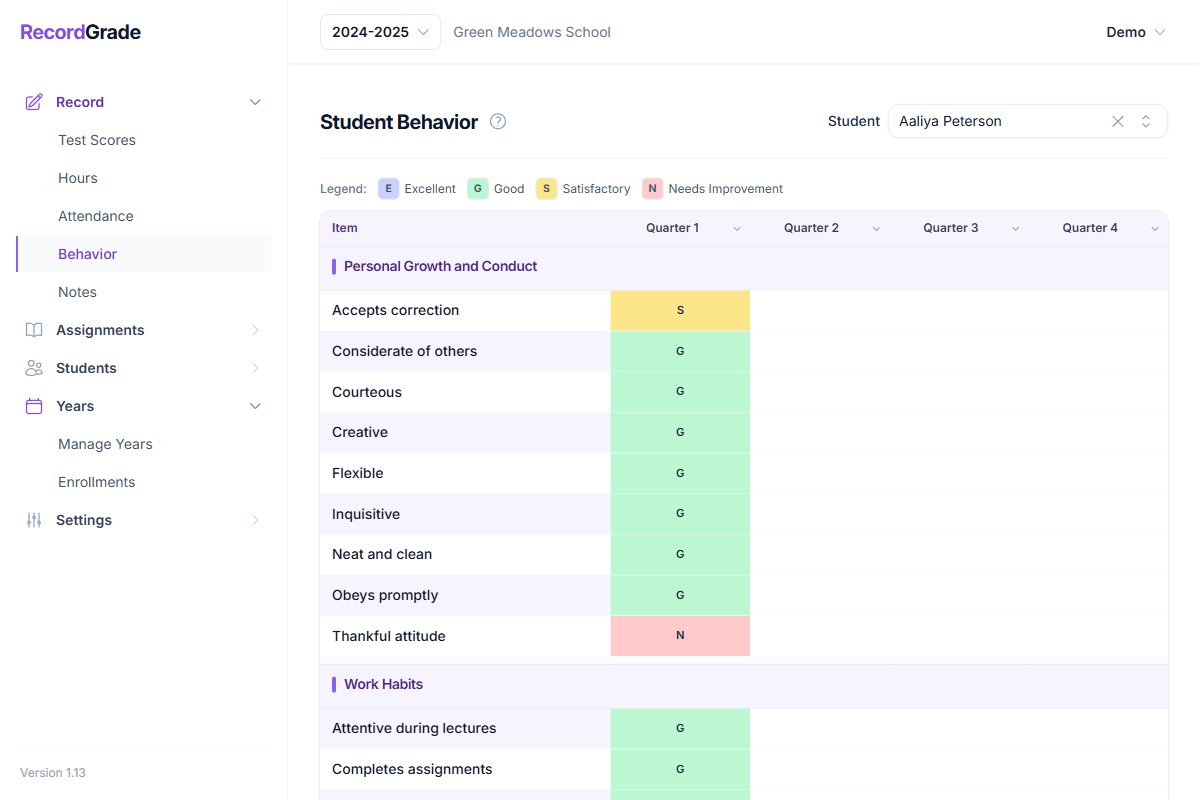
Record → Behavior — rate year-enrolled students per term (one rating grid per school-year term). Column headers can set a whole term column at once for the class.
Notes
Record → Notes — one short comment per term per student for the report card when notes are enabled.
Report cards
Turn on Show Behavior / Show Notes under Settings → Reports. Notes appear only when text exists. Behavior prints the ratings you entered for each term.
Common questions
Can I change behavior levels/items after ratings exist?
Yes for rename and reorder. Removing an item from settings soft-deletes it (hides it from the setup list) but keeps historical ratings for reporting. You are not blocked from changing setup after teachers have entered ratings—just know renames apply school-wide and removed items stop appearing for new entry while old ratings remain on past reports.
What if I delete or rename a school term?
Behavior and notes are tied to the term id. You cannot delete a term that still has behavior or notes. Renaming a term keeps the same ratings under the new title.
Student missing from Behavior?
They must be year-enrolled in the selected year. Grade-limited teachers only see students in their grades.
Can I rate behavior without terms?
No. Create terms on the school year first. Each term is a column.
Are behavior ratings on the transcript?
They are designed for report cards. Transcripts focus on academic history; behavior is not a transcript section in the standard PDF.